

fppilot
Lifetime
-
Joined
-
Last visited
-
Perhaps more of us are former pilots......
-
I do so routinely. I have a template I use in Excel and have it sized for a 6" X 9" clear plexiglass clipboard. I scale to meet paper size and print to half-letter size paper (4.25" X 5.5"). I just cut 8.5 X 11 in half and adjust my paper tray. Once printed I laminate them with an inexpensive Xyron laminater. They hold up very well that way. Many are two-sided and with the plexiglass clipboard all I need to do for the second side is flip the clipboard over. For my most often flown aircraft, the FFX Hjet. I determined the files holding its G3000 checklists and modified them using Notepad++. They are json files and it takes extreme attention to detail to find success. One space or comma out of place can cause a great deal of frustration, but the end result has been rewarding.
-
This has been a recent issue for me as well. For just one control, my HC Alpha. One profile selection is settling on a default MSFS 2024 profile. Before each and every flight I have needed to change that setting to an actual HC Alpha saved profile. The MSFS 2024 typical persistence that exists, carrying that profile in place from one MSFS 2024 to the next is not carrying over as it has previously done.
-
MSFS 2024. Hjet selected. Start a flight. Check Settings, Controls. What specific MSFS Profile do you have selected for your keyboard? Compare the keyboard profile in use for the Hjet to the profile in use for your other aircraft. etc. I have had a couple of recent issues with 2024 and the Hjet with "perisistence", the saving or continuation of selected profiles in use from one MSFS session-to-next-session. Check all your controls profiles, including the Airplane profile. I have a strong suspicion the answer lies there in the controls settings. I am needing to change back my airplanes profile and possibly one or two more profiles from session to session for the new 2024 Hjet.
-
-
-
Removed my me.
-
Excellent find! More than valuable watch and learning. Thank you!
-
-
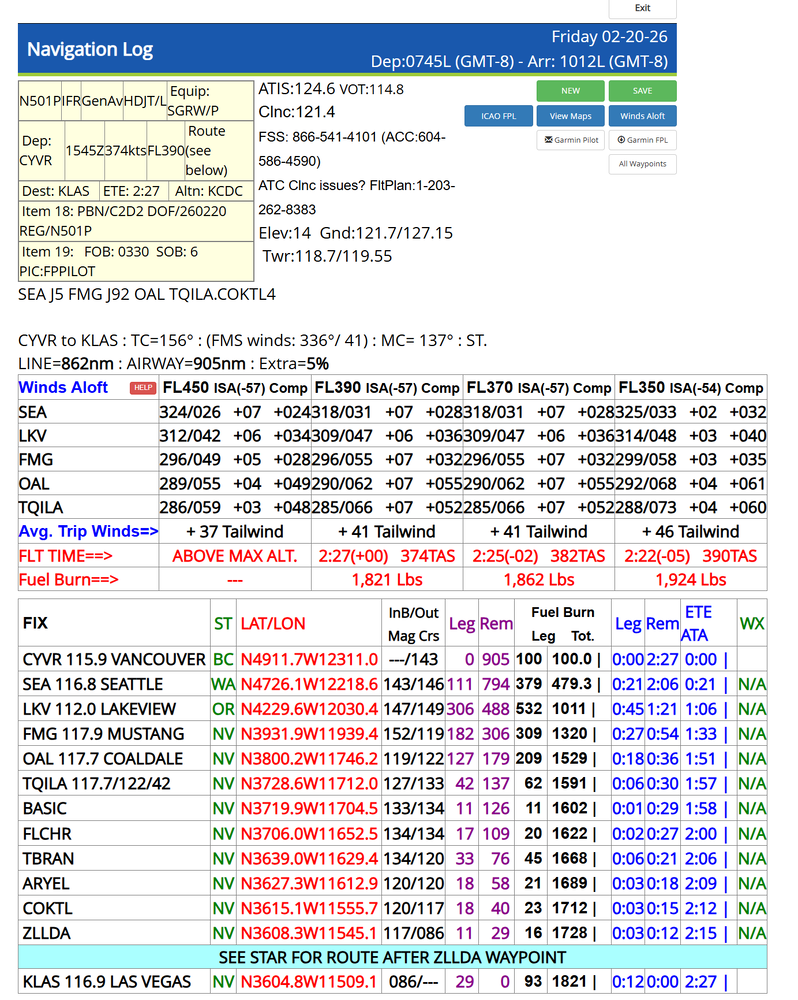
Am about to fly the forementioned Vancouver to Vegas flight. This is from my account at FltPlan.com, a real world Garmin owned flight planning site. I have a nicely tuned Hjet fuel table there based on 1,000 ft increments in altitude, and have logged 1,280 Hjet hours over 675 flights in MSFS 2020 and 2024. This plan is at FL370 (if OAT cooperate) with (6) souls onboard and storage bays at 50% of capacity. Only need to load about 2,600 lbs of fuel, and that is very close to max for overall weight. Would need less fuel with lesser pax/cargo load. I quickly move the route [SEA J5 FMG J92 OAL TQILA.COKTL4] over to simbrief for import into the Hjet.
-
You should be able to complete that flight. How fully loaded with pax and cargo were you planning? And for kripes sake, I landed today on a 4,000 ft runway at KCRG in Jacksonville, Fl, with lots of room to spare. No need to add expensive reversers to this level. This is a jet rated for a single pilot (which is an overwhelming majority of us here on AVSIM) and the acquisition and operating costs are in a class by itself. Hope the namesake company (for which I had a 25 yr career) holds the line on the Elite while currently designing and already testing models with more capicity and reach. Hope Marwan and FFX follow that lead.
-
Elite II. Like the namesake real world model features selectible FMS speed control and autothrottle. You may be welcoming with wide arms the upgrade for previous purchasers, so be aware that the E2 enhancements were included as a no-cost improvement update of the original 2020 model. Marwan and Flight FX are clearly a cut above.
-
Real world behavior has been a driving focus of development from day one for the original 2020 version. A number of actual rated pilots on the test team. No tendancy to overstep real world, but true minuita focus on real world. Take a close look at the detail on your walk-arounds, and the flying experience is, well, spot on!
-
-
I went to Orbx. Unlocked allows editing the checklists and repainting some liveries.




